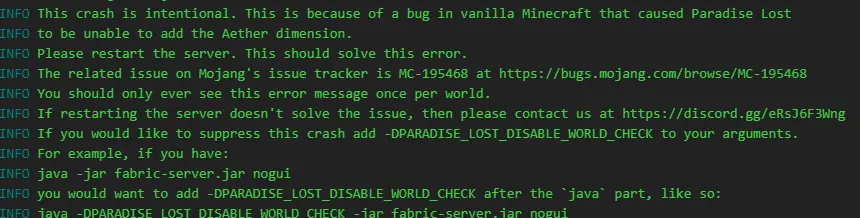
Archive #help Intentional Crash Intentional Crash Started by Rose 1 February 2023 25 replies
1 February 2023 R Rose 21:07
I just updated my mod pack and I keep receiving this message in my server console, I've restarted about 5 times and nothing has happened instead of just getting this, am I missing something?
N Noaaan Team 21:46
Did you add the argument as specified?
21:47 It should at least let you launch
R Rose 21:47
I'm actually quite not sure where to add it, I'm kinda new to servers
N Noaaan Team 21:48
If you are running the server using a start script you should be able to just follow the instructions specified
R Rose 21:48
Is the start script the console?
N Noaaan Team 21:48
If you are using a server provider/panel its a little bit different, since its case by case
R Rose 21:49
I'm using a server panel
N Noaaan Team 21:49
Which one?
R N Noaaan Team 21:52
Multicraft (what Apex uses) seems to be a bit strange in how this is setup, but there should be a jar.conf file somewhere with args
R 21:56 So, I found a jar folder with libraries, server.jar and modpack.jar but can't find anything around jar.conf
N 21:59 Unless there is an advanced option for setting the args somewhere in the panel itself, you might be out of luck
R Rose 21:59
I found these would this work?
N R Rose 22:00
Only problem is that they're locked for some reason
N Noaaan Team 22:00
I think its a JVM arg, if that doesnt work try the other
22:00 Hmmm, I guess check the info thing on the right?
R Rose 22:01
It gives me info on what it is but it won't let me use them
N Noaaan Team 22:05
Both of the boxes?
R Rose 22:10
Ohh so it seems on this panel only the support team can add an argument
N Open in Discord You'll need to be a member of the server.